.webp)
Most AI outbound agents sound the same on the surface.
But when you actually put them to work, the results can be wildly different. The secret? It’s all in the data, the messaging personalization, and how easy it is for your team to use.
This checklist helps you identify which AI agent will drive pipeline for your team, not just add another tool to your stack.
Step 1: Evaluate Data Accuracy
The success of your initiative depends on the data that the AI agents use, such as: 3rd party data like signals, your CRM data, product usage data, etc.
Accurate data ensures AI agents perform effectively and protect your brand and reputation. As the saying goes, garbage in, garbage out.
To assess the vendors’ data accuracy:
Identify 1-3 specific campaigns you want to start immediately with the AI agent. The results will be more relevant and real for your team. And once you pick a vendor, you can turn them on immediately, reducing the time to impact.
Provide each vendor with the same list of accounts and contacts so that you can compare apples to apples.
For example:
List of Customer accounts
List of Target accounts
List of Customer contacts
ICP criteria
Persona criteria
Step 2: Evaluate AI messaging
Ask each vendor to provide you with 20-30 sample emails for the campaigns to review.
Messaging is subjective, but focus your evaluation on these criteria:
Does the AI articulate the pain points I'm solving, the persona-based messaging, and any industry-specific messaging well?
Are the emails truly personalized?
“Bad AI” personalization is simple scraping output, like if [this] then [that] without considering the holistic context around that account or buyer. That’s why they sound robotic or completely irrelevant.
“Good AI” personalization:
Combines all the data points (signals) of what is happening at that account and buyers and any existing or past relationships you have with them
Knows which data points (signals) are more important
References back to its previous messaging to the buyers so that it sounds natural & human-like
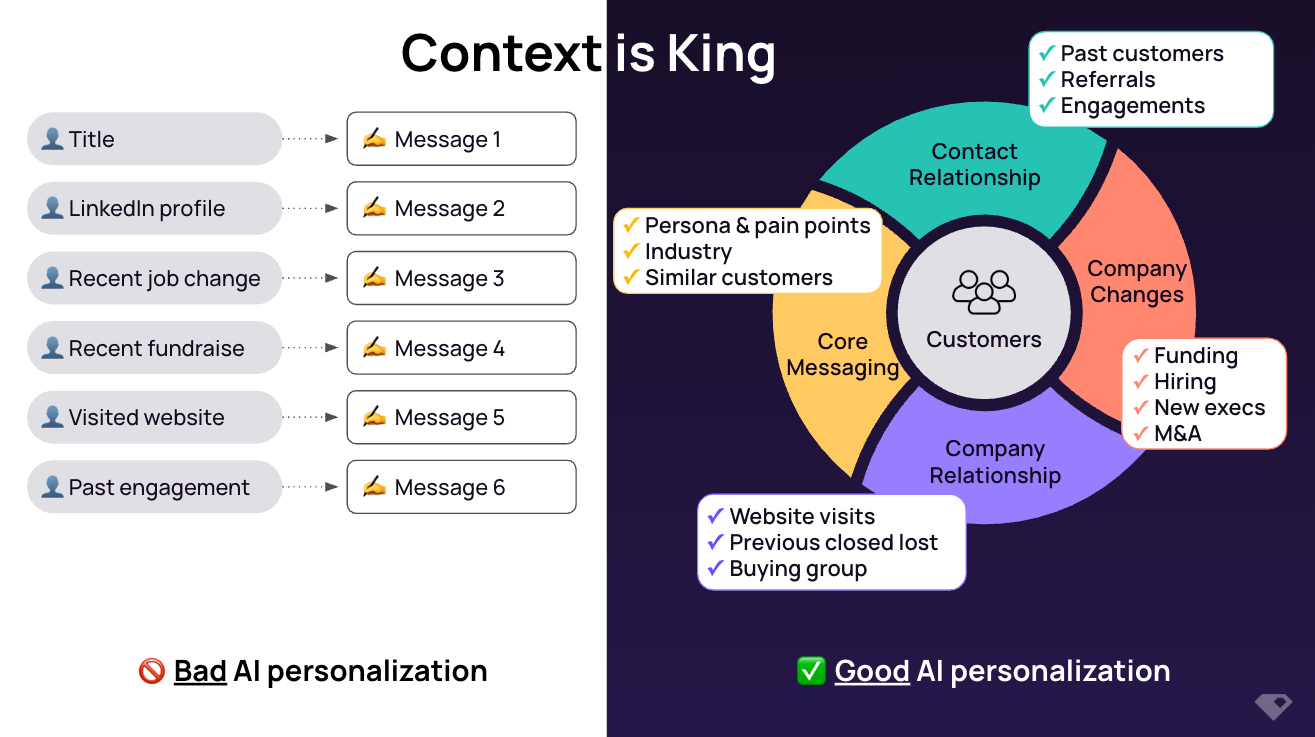
For example:

Step 3: Evaluate usability
Strong user adoption determines whether any new initiative succeeds. For AI initiatives, usability isn’t only for the end-users (i.e. SDRs and AEs) but also for the business users & admins (i.e. SDR/marketing/sales managers and Ops)
Depending on the level of AI and technical skills of your existing team, look for solutions that most of your teams can use, maintain, and scale.
Overly technical solutions could cause:
Challenges in hiring & backfilling the technical resource
A bottleneck for the existing technical resource (or dependencies on technical agency)
Your team spending time tooling & bug fixing instead of focusing on the business outcomes (i.e. generating more pipeline)
Checklist to evaluate AI agents for outbound:

Choose the right AI outbound agent by focusing on what matters: data accuracy, human-like messaging, and team usability. Focus on data accuracy, human-like messaging, and team usability to drive real pipeline impact.
If you're ready to see what a signal-based, high-precision AI outbound agent can actually do, check out UserGems. We built Gem-E to automate your best campaigns with accurate data, rich buyer context, and proven scale.
👉 Request a demo to see it in action.

%20(1).jpg)

