.png)
SDR leaders are fielding constant questions about AI implementation—and for good reason. Our recent survey of 100+ B2B revenue leaders shows 97% plan to increase AI spend, yet only 7% report measurable ROI.
The promise is straightforward: automate manual work, free reps for high-value conversations, and generate more pipeline without adding headcount.
The reality proves more complex. A recent UserGems survey of 100+ B2B revenue leaders found that while 97% plan to increase their AI spend, only 7% report measurable ROI. Nearly half see limited or uncertain value from their current tools.
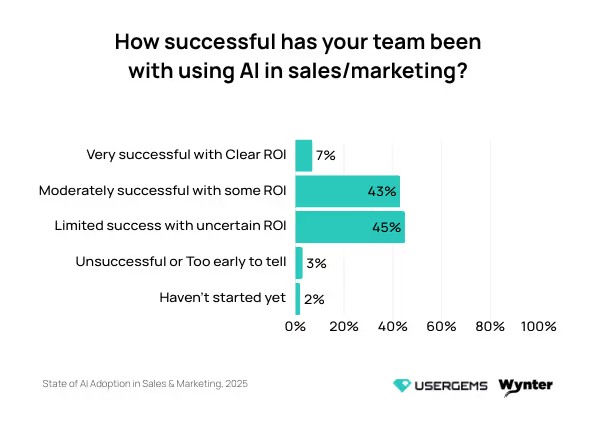
A huge gap exists between vendor promises and team results. And the data from our survey shows that most teams are running into the same walls.
We'll break down each challenge with specific fixes you can implement immediately.
The 6 core challenges of AI adoption
AI failures follow predictable patterns across SDR teams. Based on the survey data, teams face the same six challenges over and over, and most don't realize it until they've already invested months into implementation.
The top barriers teams reported were:
62% of teams say data accuracy and reliability is their top challenge
50% say they don't really understand what AI is capable of
47% face integration problems with their existing technology
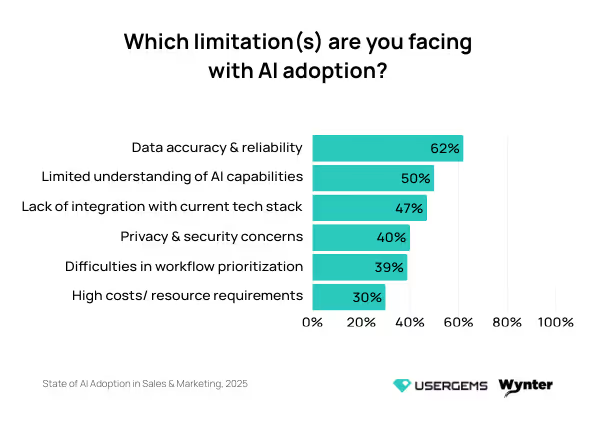
Here's what each roadblock looks like and how to fix it.
1. Data accuracy & reliability
The problem: AI needs clean, structured data to function, but most SDR teams are sitting on a mess of outdated contacts, incomplete records, and inconsistent formatting.
AI requires current contact information and consistent industry labeling to function properly, but most teams have outdated job titles and multiple labeling systems. The system processes your data and generates nonsensical recommendations.
One data specialist on Quora puts it even more bluntly:
"The first and most important is to accept the realization that data is inherently dirty. I have heard such claims by non-data people that 'our data is of very high quality'.
This mindset stems from their lack of data expertise. It is only the data-savvy who can dig deep into data to ascertain the quality. In most cases, data is a mess down at the source."
Warning signs: Your SDRs are manually double-checking AI-generated emails before sending them, prospects are responding with corrections about their job titles, or your AI tools keep pulling outdated information that makes your team look out of touch. One marketing leader from our survey:
"The biggest lesson is that how good your outputs are is 100% dependent on how good your inputs are. Whether it's to ensure you have all the relevant data, APIs, background information, etc. The quality is based on how good it is." - Senior Email Lifecycle Marketing Manager 1001-5000 employees, SaaS/software
How to fix it:
Audit your current data sources to outline gaps, duplicates, and inconsistencies before you set up any AI tools
Set up automated data validation rules in your CRM to spot formatting errors and missing information at the point of entry
Invest in data enrichment tools that automatically update contact and company information from reliable third-party sources
Create standardized data entry processes and train your team on consistent field formatting across all systems
Schedule regular data cleaning sessions where your team reviews and updates prospect information in batches
2. Limited understanding of AI capabilities
The problem: Most teams jump into AI without a clear picture of what it can and can't do. They buy tools based on impressive demos, but once implemented, teams only use basic features. SDRs end up using maybe 10% of the functionality while leadership wonders why they're not seeing the promised ROI.
According to our survey, 17% of teams admit they don't know what their AI tools are capable of doing. This knowledge gap starts at the top, as one of our respondents explained:
"Even though leadership pushes the use of AI, they don't provide time for learning, or specific use cases." - Director of Integrated Marketing and Demand Generation ABM, 501-1000 employees, SaaS/software
Warning signs: Six months post-implementation, and your team still only uses the most basic features. SDRs bypass the AI for complex tasks because they remain unaware of its capabilities. When vendors release new features, teams miss them because they still struggle with existing functionality.
A Reddit user in r/technology describes the problem:
“We are already in the danger zone. Users lack understanding of how it works, and on the corporate side, we are being told to integrate it in workflows with claims of a massive efficiency boost, but The benefits remain unclear so far.”
How to fix it:
Map out your SDR's daily and weekly workflows, then see exactly where AI could save time or improve results
Run focused pilot programs with 2-3 SDRs testing specific use cases for 30 days before rolling out company-wide
Document every successful AI use case with screenshots and step-by-step instructions so others can replicate it
Schedule monthly vendor check-ins to learn about features you're not using and get guidance on your specific challenges
Start with one simple, well-defined use case and master it completely before expanding to more complex applications
3. Lack of integration with the tech stack
The problem: Your AI tool functions independently but lacks connections to your CRM, email platform, and other daily systems.
This creates a nightmare of manual data transfers, copy-pasting between windows, and duplicate work that defeats the whole purpose of outbound sales automation. This disconnect between tools is a major pain point, as one respondent told us:
"It's very helpful to create a learning journey to help people not only learn what and why, but also how to implement best practices and give people the opportunity, time, and space to practice." - Director of Business Development, 201-500 employees, SaaS/software
Warning signs: Your SDRs toggle between multiple browser tabs to complete a single workflow. They're manually entering the same information into multiple systems. The AI brings great insights, but getting them into your CRM takes five extra steps that nobody has time for.
How to fix it:
Break down your team’s workflow from prospecting to booking meetings to understand every point where data moves between systems
Make native integrations a priority when selecting AI tools — if it lacks native CRM integration, think twice
Create clear documentation to explain to SDRs exactly how data should flow between systems and what to do when connections break
Set up automated data syncing so information flows between systems without manual intervention from your team
💡PRO TIP: UserGems works natively inside Salesforce and HubSpot from day one—no integration work required. Your data flows automatically between UserGems, your CRM, and sales engagement tools like Outreach and Salesloft - automatic API management, instant syncing, and single source of truth for records.
4. Privacy & security concerns
The problem: Companies are terrified of putting sensitive data into AI systems without understanding what happens to it. Legal departments block implementations without clear data security guidelines, IT teams demand extensive vendor security reviews, and leadership worries about competitive information leaking.
These concerns reflect real risks. Reddit users regularly share warnings like this one:
"You should assume anything you load into a cloud-based system is being saved for the purposes of training new models and such. So that proprietary trading formula used by your firm that makes everything work.
That secret sauce you/your company uses to get an edge on their competition has a chance of ending up in ChatGPT 5o. So now, when any person asks how to do what your company does, it's entirely possible that a new model will answer with the proprietary information you volunteered."
Warning signs: The warning signs center on delayed decisions. Legal and IT keep pushing back decision dates, sales leaders get frustrated with the delays, and SDRs start using personal ChatGPT accounts because they're tired of waiting.
How to fix it:
Start with enterprise versions of sales intelligence tools that offer clear data protection agreements and keep your data private and separate from model training
Create explicit AI usage policies that spell out what data can and can't be uploaded to which systems
Choose vendors that offer SOC 2 compliance, data processing agreements, and clear documentation about data handling
Consider on-premise or private cloud deployments for highly sensitive data rather than avoiding AI altogether
Set up regular security audits to monitor how teams are using AI tools and spot shadow IT before it becomes a problem
5. Difficulties in workflow prioritization
The problem: Teams implement AI without deciding which workflows need it, so they end up automating random tasks that don't impact revenue. The AI then brings endless "insights" and recommendations that fall outside team priorities. SDRs get buried under suggestions about who to call, what to write, and when to follow up.
Our survey found that teams expect AI to analyze data faster, spot process gaps, and deliver insights with recommendations. But without human judgment to filter and prioritize these outputs, they quickly become overwhelming.
One senior marketing manager from our survey put it perfectly:
“AI can surface data trends and suggestions, but deciding what to prioritize, where to invest, and how to adapt is human all day. Org politics, business prioritizes, macroeconomics isn't on a dashboard or output ever."
Warning signs: Your AI tool flags hundreds of "high-priority" accounts, but SDRs face overwhelming choices about where to start. They're spending half their day just sorting through AI recommendations. The tool treats every signal like it's urgent, so your team has stopped paying attention to any of them.
How to fix it:
Create strict rules for which AI suggestions get through to your team (minimum deal size, specific industries, etc.)
Run a two-week test where SDRs only act on AI recommendations that meet three specific criteria you define
Give SDRs veto power to dismiss AI suggestions without explanation so they're not slaves to the algorithm
Build a simple thumbs-up/down system so SDRs can train the AI on what's truly useful
Pick one complete workflow to automate end-to-end rather than sprinkling AI across ten different processes
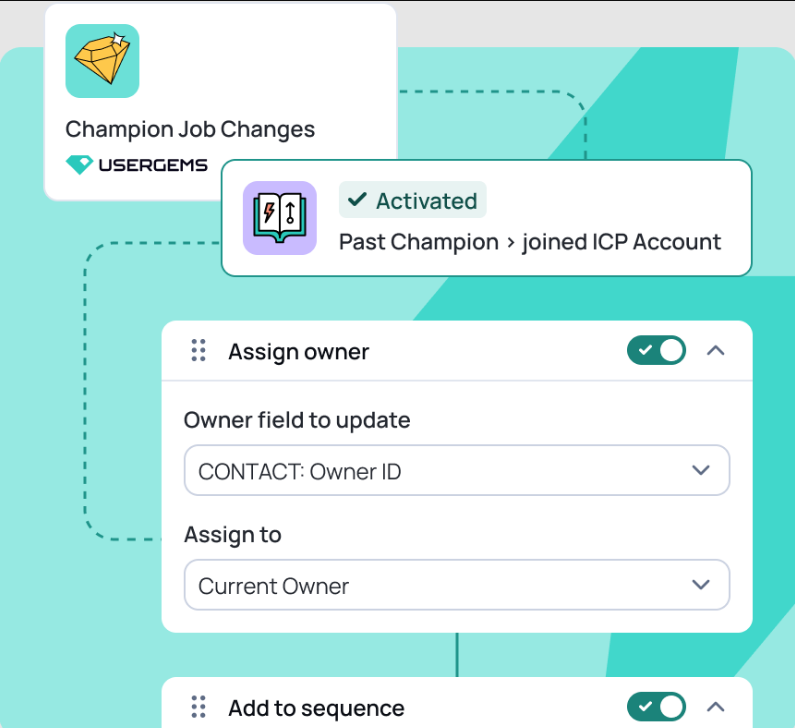
💡 PRO TIP: UserGems lets you control what reaches your team through customizable workflows and signal combinations. You can set up workflows based on account criteria, personas, and signal types, so reps only see opportunities that match your ICP and strategy.
6. High costs & resource requirements
The problem: AI vendors are charging enterprise prices for tools that may take months to deliver value. Between the software costs, implementation fees, training expenses, and time investment, teams face six-figure commitments while the tool's value remains unproven.
Part of the problem is vendors adding 'AI' labels to justify higher prices, as one of our respondents told us:
“AI is on a massive hype cycle; most software companies are claiming to be AI, very few qualify, making it a buzzword that companies use for marketing purposes rather than technical accuracy. It's just a way to try and get interest in your product.” - Senior Marketing Manager, 10,000 employees, SaaS/software
Warning signs: Your AI tool costs are eating up a significant portion of your sales tech budget, you're paying for advanced features that your team rarely uses, or you're spending more time managing the AI system than benefiting from it.
How to fix it:
Calculate the true total cost of ownership, including implementation time, training, and ongoing management resources
Start with pilot programs or month-to-month contracts then evaluate annual enterprise deals after proving value
Set clear ROI milestones at 30, 60, and 90 days with an exit clause for underperformance
Consider starting with cheaper point solutions for specific problems before you invest in more comprehensive platforms
Additional implementation challenges to consider
Beyond the top survey results, several other challenges deserve attention. These issues appear frequently enough to warrant planning.
Here's what else to watch out for:
Change management resistance: Your SDRs might see AI as a threat to their jobs rather than a tool to help them. Nearly a third of teams in our survey pointed to staff resistance as a major adoption challenge. SDRs will find creative ways to work around the system or demonstrate its failures. You need a clear message about how AI enhances their jobs and increases their effectiveness.
Over-automation syndrome: Teams get excited and try to automate everything at once. This creates fragile systems that break constantly and confuse SDRs who struggle to determine when to trust the machine. Start small, automate one thing well, then gradually expand.
Vendor lock-in risks: Once you've built your workflows around a specific AI tool, switching requires extensive time and resources. You're stuck with whatever pricing and feature changes they make. Build in flexibility from day one so you're not held hostage by a single vendor.
The "black box" problem: Your AI scores leads and suggests actions, while keeping its reasoning opaque. SDRs are supposed to trust a system they don't understand, which proves impossible in practice. When AI decision-making remains opaque, your team will create their own processes and ignore the tool.
A strategic framework for successful AI implementation
Most AI implementations fail because teams attempt full automation in three months instead of building incrementally.
The right approach starts with core functionality, then expands once that foundation proves stable.
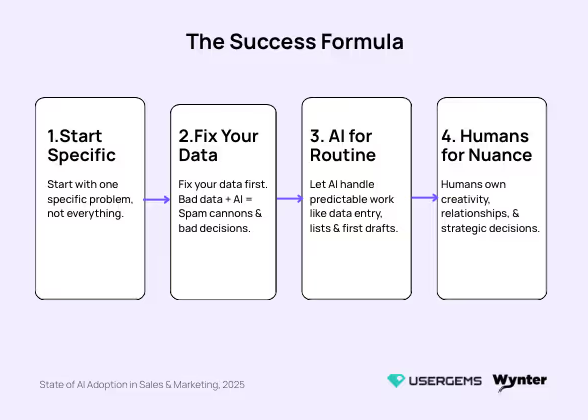
Start with one high-impact problem where success is measurable, then expand. Then you give AI the routine tasks while your team focuses on higher-value work. And you always keep humans in charge of decisions that need context and creativity.
Four principles drive successful implementation:
Position AI as a co-pilot, not an autopilot
Why this matters: SDRs need to see AI as a tool that makes them more effective, a tool that enhances their effectiveness. When positioned correctly, AI handles research and administrative tasks while SDRs focus on relationship-building and deal progression. Here’s how one of our respondents explained it:
"AI can be super intimidating for team members to adopt. They know they need it, but they are worried it will replace them if they prove how effective it is. This has been the biggest hurdle." - Director of Demand Generation, 1001-5000 employees, SaaS/software
How to implement:
Frame AI as your SDRs' personal assistant that handles research and admin tasks they hate anyway
Show SDRs exactly which tasks AI takes over and which high-value activities they can now focus on instead
Train SDRs to review and customize AI-generated content before sending it, ensuring personalization and accuracy
Give SDRs control over when and how they use AI allowing them to choose when and how they use AI
Let SDRs customize and train their AI tools so they feel ownership over the technology
Example: Have AI analyze your CRM data every morning and flag the five best prospects for each SDR to contact that day. The AI explains why each prospect looks ready to buy, but SDRs decide how to reach out. They might call one, email another, and save the third for next week based on what they know about the account.
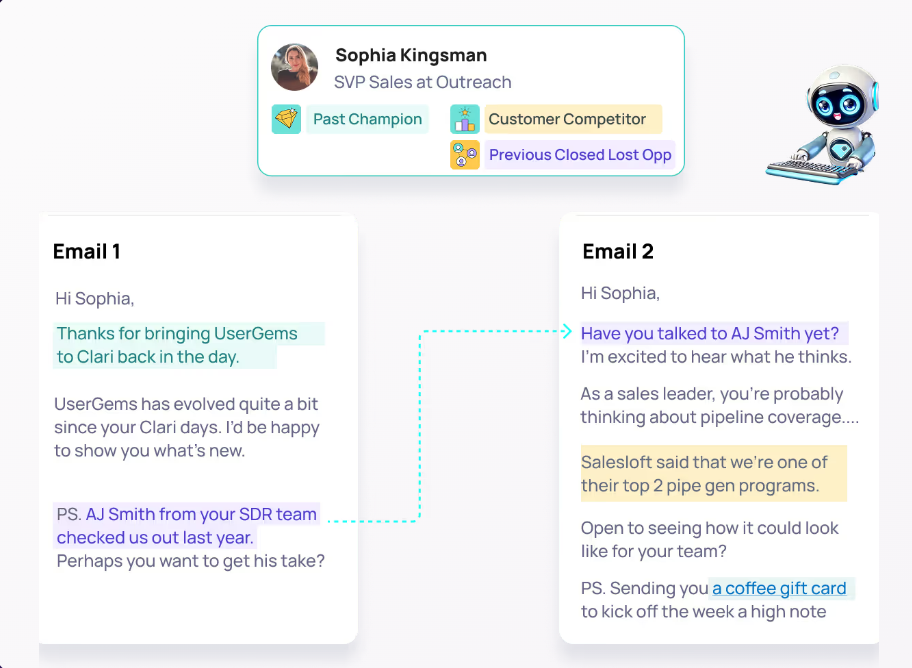
💡 PRO TIP: Your team decides how much AI control they want. UserGems can run completely hands-off for low-priority segments or require human approval for enterprise accounts. SDRs even pick up best practices by watching how Gem-E structures messages and uses buying signals to personalize outreach.
Prioritize integration and data quality over shiny features
Why this matters: A simple AI tool with strong system integration delivers more value than a sophisticated standalone platform. Teams often discover this after purchasing platforms that lack data access or workflow integration. Data quality must come first, as one respondent explained:
"Data quality is important for AI to work properly. CRM data, including validations and flows, needs to be structured in order for AI to deliver productivity improvements." - Senior Director of Revenue Operations, 1001-5000 employees, SaaS/software
How to implement:
Choose AI tools that integrate natively with your CRM even if they offer fewer features, prioritizing integration quality
Create a "data readiness checklist" that every team must complete before they get access to AI features
Test data flow between your CRM and AI tool with real prospect records during the pilot phase
Run a data quality audit every quarter to spot decay before it affects your AI performance
Example: A sales team chose an AI tool with fewer features specifically because it had pre-built Salesforce integration. They were up and running in two weeks, while another team that chose a "more advanced" platform spent four months trying to connect their systems.
Start with one solvable problem to build momentum
Why this matters: Most AI failures happen because teams bite off more than they can chew. Choose one manual process everyone hates and let AI handle it. When that's running smoothly, expand from there.
The key is to start small and prove value before you expand, as one marketing manager from our survey advised:
“Start small with redundant, manual tasks. Not everything needs to be big and splashy right away." - Senior Marketing Manager Community Growth, 5001-10000 employees, SaaS/software
How to implement:
Choose a problem where success is easy to measure, like hours saved per week or the number of meetings booked
Pick something that affects every SDR daily so the whole team experiences the win together
Avoid complex problems that touch multiple departments or where you need to change ten different processes at once
Example: Instead of implementing AI for lead scoring, email writing, and call analysis all at once, start with just prospect research automation. Once your SDRs consistently save 30 minutes per day on research and see the value, they'll be eager to see how AI can help with email personalization or call preparation.
Measure pipeline contribution, not just activity
Why this matters: AI can pump out thousands of emails and make hundreds of calls, but those numbers only matter when they create pipeline. The real test is whether AI helps SDRs book more qualified meetings and close deals.
Too many teams celebrate vanity metrics while their pipeline stays flat, as one of our survey respondents noted:
“Pipeline generation is a massive problem. Also, surfacing accounts that have strong buying intent has been a futile endeavor so far.” - Senior Director of Revenue Operations, 1001-5000 employees, SaaS/software
How to implement:
Track meetings booked and pipeline generated per SDR before and after AI implementation
Measure the quality of AI-sourced leads by tracking how many convert to opportunities and eventually to closed deals
Monitor the time from first touch to meeting booked to see if AI is accelerating your sales cycle
Track whether SDRs using AI features hit their quotas more consistently than those who don't
Example: One company's AI system increased its prospect research speed by 50%, and leadership was thrilled with the productivity gains. When they checked pipeline data later, though, closed deals hadn't increased at all. Faster research proved irrelevant because they targeted prospects outside the buying window.
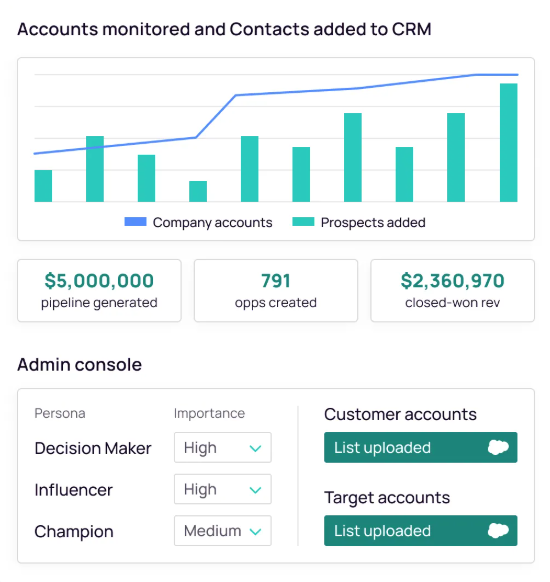
💡PRO TIP: UserGems makes pipeline attribution crystal clear - every opportunity shows which signal triggered it, when the outreach happened, and how it progressed through your funnel. The platform tracks influenced pipeline automatically, so you can see exactly how much revenue came from job changes versus new hires versus other buying signals.
The complete AI outbound platform for SDRs
These challenges point to a fundamental problem: most AI tools weren't built for SDR workflows.
Most AI tools are generic platforms that require extensive customization to work with existing SDR workflows.
SDR teams need an AI platform built specifically for outbound sales—with clean data, native integrations, and transparent AI scoring as core features.
UserGems was built to solve these specific problems.
UserGems is an AI outbound platform that runs your entire account-based strategy on autopilot - it outlines high-intent accounts, writes personalized messages using AI, and executes proven playbooks that generate pipeline within weeks.
Here's exactly how UserGems handles the real problems SDR teams face:
Always-on signal monitoring: UserGems monitors your accounts 24/7 for job changes, promotions, funding rounds, leadership changes, and dozens of other buying triggers. Your team finds every opportunity systematically, not by random LinkedIn browsing.
Signal to sales queue instantly: When a key account changes jobs or shows intent, UserGems automatically creates the contact record, fills in the details, and puts a task in your rep's workflow. The entire process from signal to sales-ready lead takes seconds, not hours.
AI that writes like your best rep: Gem-E, our AI agent, writes personalized emails using the specific signal, your relationship history, and product positioning. Each email reads like your top performer spent 20 minutes researching and writing it, except it happens instantly.
Fits your current workflow: UserGems integrates with Salesforce, HubSpot, Outreach, and Salesloft. Your reps open their usual tools and find prioritized leads with messages ready to send – single platform access, unified workflow, and immediate usability.
Automation that preserves relationships: The AI handles the tedious parts, such as finding signals, building lists, and drafting initial messages, while reps stay in charge of the human side. They review the AI's work, bring their personal touch, and focus on conversations instead of data entry and research.
SeekOut proves what happens when you implement this right. They were sitting on thousands of former customers in recruiting who had moved to new companies – warm leads sitting untapped. Once they integrated UserGems, the results were immediate.
They saw 5X ROI in the first year, $1.5M in influenced pipeline, and reply rates hitting 15-25%. Champion tracking quickly became their top pipeline source.
UserGems guarantees results. We guarantee pipeline worth your investment or refund your money. Easy as that.
See how UserGems drives pipeline for SDR teams. Book a demo today and see why teams commit fully to automated prospecting after UserGems.
FAQs
What is a good first use case for implementing AI with an SDR team?
One of the best starting points is to automate email personalization for inbound leads. Let AI pull relevant information about the prospect and their company to create personalized first lines and value props. It's low risk, high impact, and SDRs see immediate time savings
How does implementing AI change the role of an SDR manager?
AI frees managers from spreadsheet hell and constant pipeline reviews. They can now focus on actually coaching SDRs through tough deals, developing personalized training plans, and building team culture.
What are the most important things to look for when evaluating an AI vendor for sales development?
Here's what matters when choosing an AI vendor:
Native CRM integration: If it doesn't connect seamlessly with your Salesforce or HubSpot, you're signing up for months of headaches.
Data requirements transparency: Vendors should tell you exactly what data quality you need and help you get there.
Proven SDR workflows: Look for vendors who can show specific use cases for SDRs, not generic "sales acceleration" promises.
Clear ROI metrics: They should guarantee specific, measurable outcomes within a set time period or offer an exit clause.
Implementation support: You need hands-on help getting started, including personalized onboarding beyond documentation and training videos.
Scalable pricing: Ensure costs scale predictably when you add more SDRs or increase usage.
How long does it typically take to see a return on investment (ROI) from an AI sales tool?
Most teams usually need 3-6 months to see real ROI, with the first month devoted entirely to setup and training.
Quick wins like faster research should appear within weeks, but meaningful pipeline impact will probably take a full quarter.
What are the specific tasks SDRs should still own versus what AI should handle in a co-pilot model?
AI is best at research, data enrichment, email drafting, lead scoring, and spotting buying signals across thousands of data points.
SDRs should focus on building trust, reading between the lines on calls, personalizing outreach based on nuanced context requiring human judgment, and deciding when to break from the playbook.

%20(1).jpg)

